AI Vocal Remover
Remove vocals from songs online and create clean instrumentals, karaoke tracks, backing tracks, and acapellas in minutes. Upload your file, preview the split, and download the version you need.
Remove vocals from a song in three steps
Upload a song, let the model process it, then preview and download the result. The main outputs are a vocal-free instrumental and an isolated vocal, which makes this page useful for karaoke, remixing, practice, editing, and content creation.
1. Upload your file
Upload MP3, WAV, FLAC, AAC, M4A, or video files such as MOV for vocal removal. Higher-quality files usually separate more cleanly than low-bitrate audio.
2. Process the track
The AI analyzes the audio to separate it into stems, creating separate tracks for vocals and instrumentals. This allows you to use the specific version or stem that best fits your workflow.
3. Preview and download
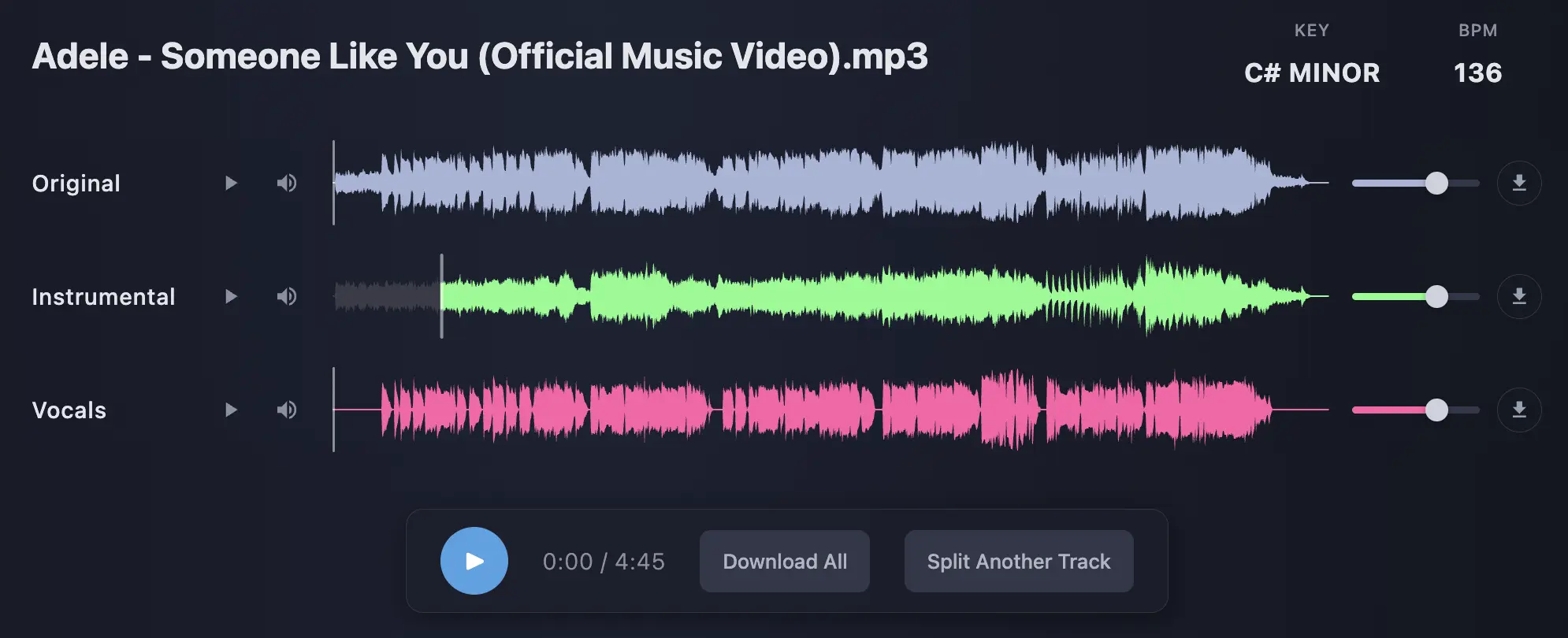
Check the split before downloading by listening to a preview of the separated tracks. After you are satisfied, you can export the instrumental for karaoke or backing music and the vocal output for an acapella.
Built for fast, usable vocal removal
Most people searching for a vocal remover want one thing: a split they can actually use. This page stays focused on that job. You upload a track, and in seconds—often under a minute—you get a fast instrumental and vocal output, then move straight into karaoke, remixing, practice, or editing.
What cleaner results depend on
Separation quality is shaped by the original mix. Songs with clear lead vocals, less heavy reverb, fewer stacked harmonies, and better source audio usually split more cleanly. Dense mixes, distortion, and low-bitrate files leave more bleed and artifacts.
Why this vocal remover stands out
Some vocal removers are built for quick demos. Others bury the core job under too many options. This online vocal remover uses powerful AI technology for accurate separation, giving you a fast, usable split first, then letting you clean or extend the result only if you need to. Your feedback helps us continue to improve and evolve the platform for even better results.
Fast first result
Upload a track, preview the split, and get to a usable instrumental or acapella without overcomplicating the workflow.
Clear next steps
If the result needs more work, move into vocal cleaning or deeper separation from the same ecosystem instead of starting again somewhere else.
Preview the split before you download
The main outputs are simple: a vocal-free instrumental and an isolated vocal. That covers the main reasons people use a vocal remover or voice remover: karaoke tracks, backing tracks, practice instrumentals, remix ideas, acapellas, and content edits. The voice remover feature is ideal for creating remixes or practicing your favorite song, making it easy to generate custom instrumentals or acapellas for any project.
Preview the original, isolated vocal, and instrumental before downloading. That makes it easier to judge bleed, artifacts, and whether the split is good enough for karaoke, remixing, practice, or vocal work.
What you get
- Instrumental: useful for karaoke, rehearsals, covers, DJ edits, background music, or creating high-quality instrumental tracks for sampling and other music production needs.
- Instruments: extract individual instruments from a song, making it easy to isolate drums, bass, or other musical components for remixing, practice, or creative projects.
- Vocals / Acapella: useful for remixing, sampling, tuning, mashups, and vocal study.
- Full Mix Reference: useful for comparing the split against the original track.
- Advanced split options: available when you need more control than a standard vocal/instrumental split.
How to get cleaner splits
- Use WAV or FLAC when possible: lossless files usually beat low-bitrate MP3 for separation quality.
- Expect more bleed in dense mixes: stacked vocals, big reverbs, and distortion are harder to isolate perfectly.
- Clean up light artifacts after download: gentle EQ, de-reverb, or gating can improve the result.
- Match expectations to the job: a karaoke instrumental needs a different standard than a pristine remix acapella.
Built for real vocal remover workflows
This page is for people who need practical outputs, not fluff. Use it to remove vocals from songs, create instrumentals for karaoke or live performance, extract acapellas for remixing, or generate clean backing tracks for rehearsals, edits, and short-form content.
You can access our site to remove vocals from any song free of charge, making it easy to get high-quality backing tracks and acapellas whenever you need them.
Music producers
Create fast remix starting points, strip a lead vocal for arrangement work, or pull an acapella for processing, sampling, tuning, or rebuilding in a DAW.
DJs and remixers
Make quick edits, mashups, and transitions when you need a usable vocal or instrumental without opening a full production session.
Singers, musicians, and creators
Practice over an instrumental, create karaoke versions, study phrasing, or build content with cleaner backing tracks and isolated vocals. Musicians can use the vocal remover tool to play along with instrumentals for practice or live performance, enhancing their skills and personal branding.
Why some songs separate cleanly and others do not
Not every split will sound the same. The result depends on the source file, the mix, and how tightly the vocal is blended with drums, synths, guitars, bass, and effects. Clean source audio usually produces cleaner outputs. Low-bitrate files, heavy limiting, wide stereo effects, and dense vocal stacks make separation harder.
What helps
- Clear lead vocal placement in the original mix
- WAV or FLAC source files instead of heavily compressed audio
- Less heavy reverb, chorus, or distortion on the voice
- A practical target: karaoke instrumental versus pristine remix acapella
What makes separation harder
- Layered harmonies and stacked vocals spread wide in stereo
- Dense synth walls or guitars sitting in the same range as the voice
- Clipping, aggressive limiting, or crunchy lossy compression
- Old, low-quality uploads where detail is already gone
Vocal remover FAQ
Answers to the main questions before you upload.
What is a vocal remover?
A vocal remover is a free online service that uses artificial intelligence to separate vocals from instrumentals in a song. This process allows you to create a karaoke version (instrumental only) or an acapella version (vocals only) from your audio tracks.
How does the vocal remover work?
Our vocal remover leverages advanced AI and machine learning algorithms to accurately and efficiently separate vocals from the instrumental parts of your music. This enables you to easily generate a karaoke version for singing along or practice, as well as isolate the vocals for remixing or sampling purposes.
Is this vocal remover free to use?
Yes. You can test separation quality without installing software. Paid access unlocks faster processing, higher limits, and saved outputs.
What does a vocal remover actually do?
A vocal remover separates a song into vocal and instrumental outputs. That lets you create an acapella, karaoke track, backing track, or instrumental version from the same source file.
How do I remove vocals from a song?
Upload the file, let the tool process it, preview the outputs, and download the version you need. Use the instrumental for karaoke or backing music and the vocal output for remixing or vocal work.
Can I use this as a karaoke maker or instrumental maker?
Yes. One of the main jobs of this page is creating vocal-free instrumentals for karaoke, practice, covers, rehearsals, and content.
Is this also an acapella extractor?
Yes. Download the vocal output when you want an acapella for remixing, sampling, tuning, pitch analysis, or creative processing.
What file types are supported?
You can upload MP3, WAV, FLAC, AAC, and M4A. WAV and FLAC usually give the cleanest results because they preserve more detail.
What is the best file format for vocal removal?
WAV and FLAC usually separate more cleanly than low-bitrate MP3 because they preserve more detail from the original mix.
How do I get cleaner results?
Use the highest-quality file you have. Dense mixes, stacked vocals, heavy reverb, and low-bitrate audio are harder to separate cleanly than simpler, cleaner source material.
Do you train on my audio?
No. Your upload is processed to generate your result. It is not used to train models.
What happens to my files, and are they private?
Uploads are processed over HTTPS and treated as private creative work. Free uploads are removed after processing. Premium users can keep outputs saved privately in their library.