Loudness & Level
AI mastering helps lift the perceived loudness of your track while controlling peaks so the master feels competitive without harsh clipping.
Upload your song and hear an AI mastered version in seconds. BeatsToRapOn analyzes your mix for loudness, clarity, bass control, stereo width and streaming playback, then lets you compare the original track against the mastered version before downloading.
Master your music online without installing software, waiting on an engineer or guessing how the final track will sound. Built for artists, producers and independent creators who need a cleaner, louder, more release-ready master.
Drag & Drop Your WAV, FLAC, MP3 or AAC File
or
AI mastering is the final polishing stage of music production, performed by software that analyzes your mix and applies mastering-style processing such as EQ, compression, limiting, loudness control, stereo enhancement and tonal balance correction. The goal is to make your song sound louder, clearer, more balanced and ready for playback across headphones, phones, cars, clubs and streaming platforms.
AI mastering helps lift the perceived loudness of your track while controlling peaks so the master feels competitive without harsh clipping.
The mastering engine balances lows, mids and highs so vocals cut through, bass stays controlled and the track feels more finished.
The final master is shaped for real-world listening across streaming platforms, earbuds, speakers, cars and club systems.
Mastering is only one part of the release workflow. After you master your song, use BeatsToRapOn to check the BPM and key, split stems, remove vocals, upload your music and build your artist profile.
Check tempo, musical key and Camelot code before remixing, pitching, DJing or releasing.
BPM FinderSeparate vocals, drums, bass and instrumental parts for remixing, edits and creative control.
Stem SplitterCreate instrumentals, isolate vocals or make practice versions from existing tracks.
Vocal RemoverUpload tracks, share your music, generate attention and build your public artist presence.
Artist ProfileBeatsToRapOn AI mastering gives you a fast before-and-after preview, streaming-aware loudness control, bass handling and true-peak headroom so your master translates better after encoding.
We have taken two BTR tracks and mastered them to show the before and after.
The mastered version is louder and more controlled, with stronger low-frequency energy, balanced midrange, and clearer high frequencies. It delivers a tighter, punchier, more polished sound suitable for release.
The mastered version improves loudness, balance and clarity while keeping enough movement to feel alive. It controls dynamics, strengthens low-end weight, clarifies the midrange and smooths harsh highs.
Streaming services use loudness normalization. A master can still be loud, but it needs controlled peaks, clean tone and enough punch to translate when platforms turn playback up or down.
Export your mix with headroom, avoid clipping, use WAV or FLAC if possible, and remove hard limiters from the mix bus before upload.
AI Mastering GuideGo beyond mastering. Subscribers get a full workflow for managing, storing and sharing finished tracks.
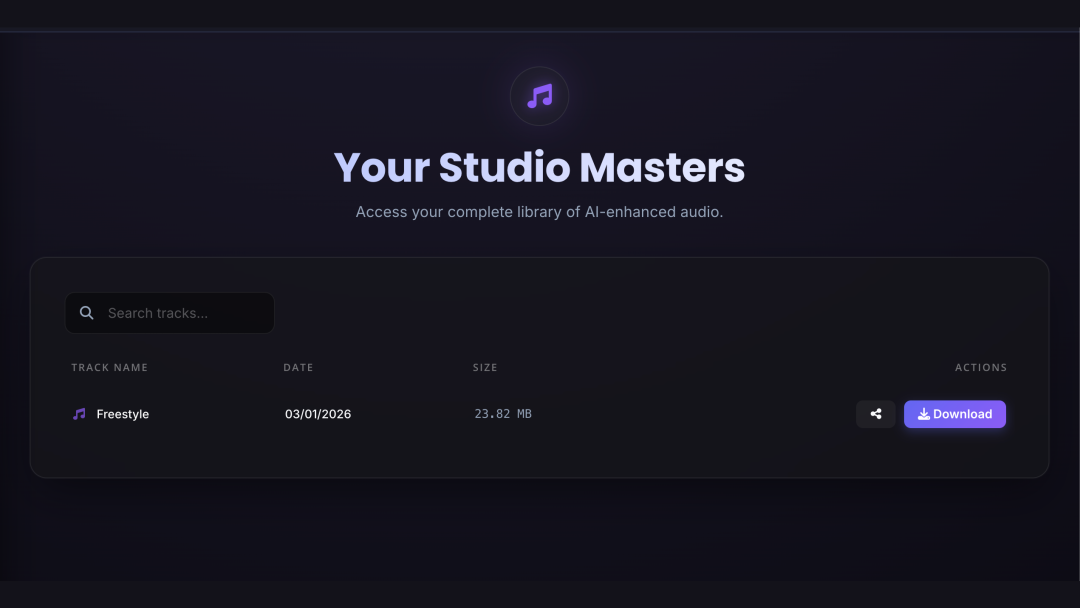
Every track you master is automatically saved to your personal, secure cloud vault. Search, sort, and access your catalog of masters from any device.
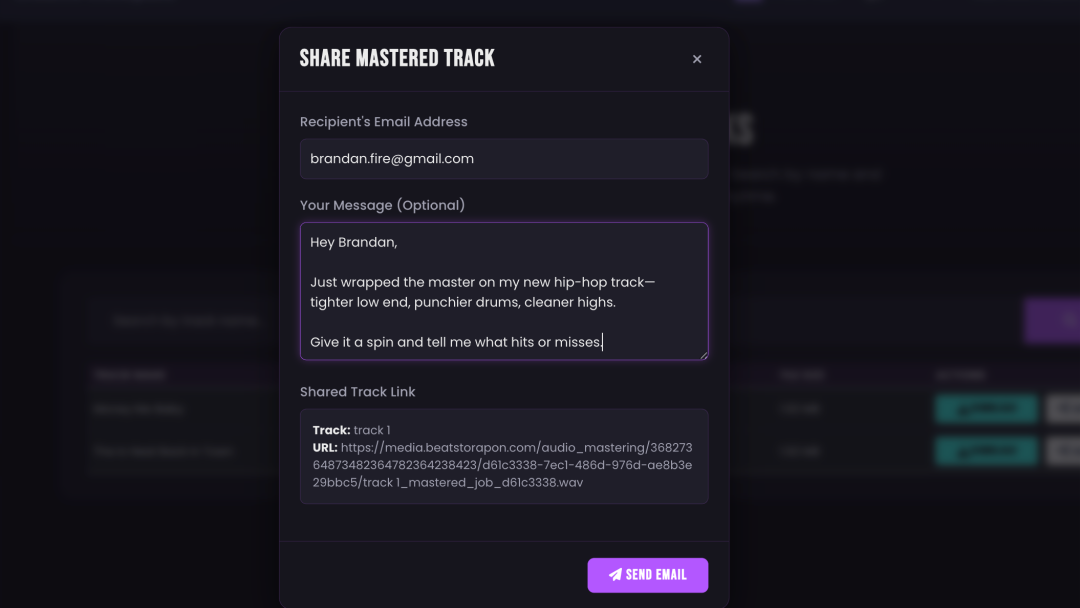
Deliver finished tracks to collaborators, clients or fans with a single click. Send a branded email with a secure download link from your vault.
No complex plugins, no waiting for engineers. Upload the mix, let the engine process it, then compare the original against the mastered preview.
Drag and drop your final mix. For best results, use a high-quality WAV or FLAC file with no limiter on your master bus.
The engine analyzes dynamics, frequencies, stereo field and loudness to build a mastering chain for the track.
Compare the original with the new AI master. If it works, download the streaming-optimized high-resolution file.
Valkyrie is built for modern independent music workflows. It listens for the things that matter in rap, hip-hop, trap, drill, R&B and Afrobeats: 808 control, vocal presence, punch, brightness, loudness and translation.
The audio mastering engine was built to deliver what matters most: a professional sound that respects your artistic vision and competes on every platform.
Targets competitive loudness and playback consistency for platforms like Spotify, Apple Music, YouTube, SoundCloud and more.
Built around modern music needs: punchy hip-hop, smooth R&B, hard trap bass, drill impact and vocal-forward mixes.
Adds loudness and polish while keeping the track from feeling crushed, harsh or over-compressed.
Download a lossless master ready for distribution, archiving, release prep and professional playback.
Controls hidden distortion that can appear after encoding, helping the master sound cleaner on consumer playback systems.
Upload new mixes and A/B test the results so you can make the right call before downloading the final master.
BeatsToRapOn is focused on AI mastering for modern independent artists, especially rap, hip-hop, trap, drill and R&B. Use this as a general feature comparison, then check each provider’s current pricing and plan details before buying.
| Feature | Valkyrie / BTR | Typical Generic Tool | Traditional Engineer |
|---|---|---|---|
| Free preview | Yes | Often limited | No |
| Fast turnaround | Seconds / minutes | Usually fast | Hours to days |
| Hip-hop and trap focus | Core focus | Often generic | Depends on engineer |
| Before / after comparison | Built in | Common | Manual |
| 24-bit WAV download | Available | Plan dependent | Usually |
| Final polishing controls | EQ, warmth, level, punch | Varies | Engineer-led revisions |
Provider plans and pricing change often. This table is for positioning and workflow comparison, not a live pricing audit.
Artists and producers use the AI mastering tool to prepare music for release, demos, collaborations and promotion.
“This is a game-changer. I ran my latest trap beat through it and the low end came out tight and powerful without getting muddy. Sounded better than the preset I usually use.”
“I needed a quick, professional master for a track I was dropping on Spotify. The AI got the loudness right and helped the vocals sit properly.”
“Finally, an AI mastering tool that understands hip-hop. It respected the dynamics of my mix while adding the right amount of punch and polish.”
AI mastering is online audio mastering powered by software that analyzes your mix and applies final processing such as EQ, compression, limiting, loudness control, stereo enhancement and tonal balance correction. The goal is to make your song sound louder, clearer, more balanced and ready for streaming playback.
Valkyrie is the AI mastering engine behind BeatsToRapOn. It analyzes dynamics, frequency balance, stereo width and loudness, then applies a mastering chain designed to improve playback translation.
This includes equalization, compression, saturation, loudness control and true peak limiting. The output workflow supports high-resolution WAV and MP3 downloads when unlocked.
You can upload your song and hear a free AI mastered preview. Full high-resolution downloads, cloud storage, sharing and final polishing tools may require a one-shot credit or subscription.
Yes. BeatsToRapOn runs AI mastering online in your browser. Upload WAV, FLAC, MP3 or AAC, wait for the analysis and compare your original track against the mastered preview.
For the best result, upload a WAV or FLAC file with clean headroom and no clipping. Avoid putting a hard limiter on the master bus before uploading because the AI needs dynamic space to shape the final master properly.
Upgrading from the free preview unlocks the full workflow for managing your music after mastering.
Many online mastering services use broad presets. Valkyrie is positioned around modern independent music workflows, especially rap, hip-hop, trap, drill, R&B, reggae and Afrobeats.
The focus is not just loudness. The engine is designed to help with 808 weight, vocal clarity, punch, tone balance and translation across playback systems.
Heavy 808s can clash with the kick drum and cloud the low end. A clean master needs the sub, kick and bass body to stay controlled without losing weight.
Valkyrie uses dynamics and tonal shaping to help tighten low-end energy while keeping punch and clarity intact.
The engine is tuned to preserve vocal presence while smoothing harshness. For R&B, soul and melodic rap, the goal is a master that feels warm, clear and controlled without making the vocal brittle.
Good mastering starts with a clean mix. Follow these steps:
Yes. The engine is built around loudness, clarity and translation. Streaming platforms use loudness normalization, so the best result is not just the loudest possible file. The better target is a master that sounds full, clean and controlled after platform playback adjustment.
A skilled human mastering engineer can make creative judgment calls on a project-by-project basis. AI mastering is different: it gives fast, consistent and affordable results for artists who need release-ready polish without the cost or wait time of a traditional studio workflow.
Yes. You keep ownership of your original music and the mastered versions created on the platform. BeatsToRapOn is a tool for processing your audio and does not claim ownership, royalties or rights to your work.