
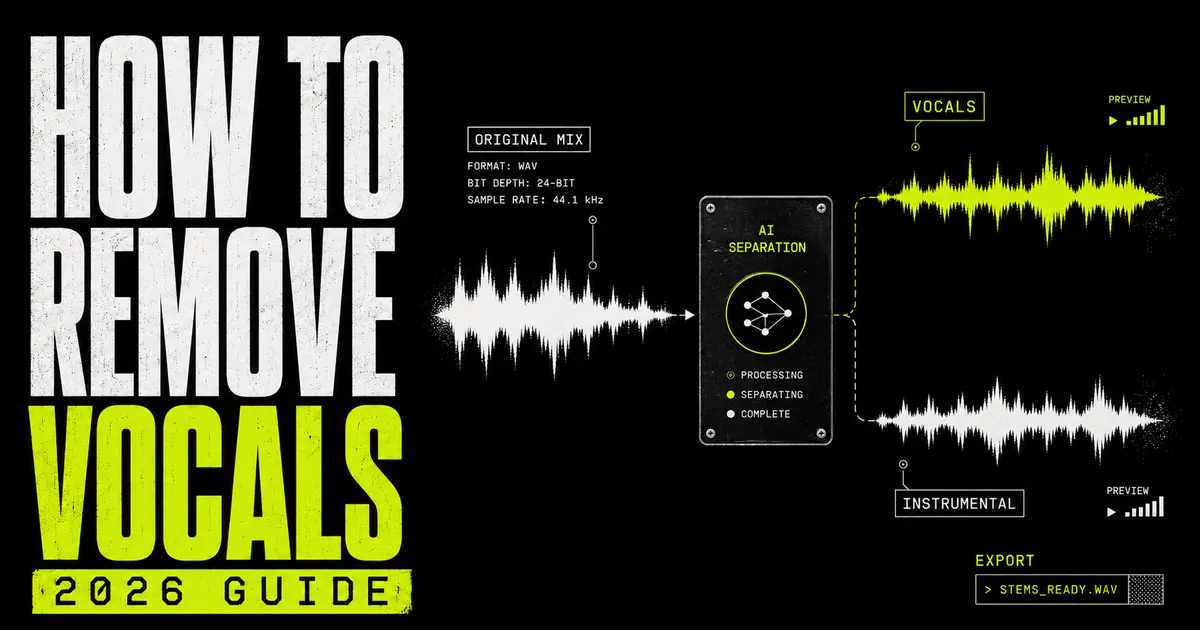
Vocal removal · upload → separate → clean
How to remove vocals from a song in 2026.
A complete 2026 guide to creating a vocal-free instrumental or isolated acapella: choose the right method, use a clean source, separate the mix, inspect the result, repair artifacts and export the format your project needs.
The fastest way to remove vocals from a song is to upload the highest-quality copy you have to an AI vocal remover, process the file, preview the separated vocal and instrumental outputs, then download the instrumental. Use a multi-stem splitter instead when you also need separate drums, bass, guitar, piano or other instruments.
Vocal + instrumental from one finished mix
What removing vocals actually means.
A finished song is normally one stereo mix, not a folder of separate tracks. Vocal removal attempts to reconstruct parts of that mix after they have already been blended together.
Modern AI tools analyse the full recording and estimate which sound belongs to the voice and which belongs to the backing music. A standard vocal remover creates two synchronised outputs: an isolated vocal and a vocal-free instrumental. A more detailed AI stem splitter can also separate drums, bass, guitar, piano and other instruments.
The result is an estimate, not access to the original studio session. Vocal reverb may remain in the instrumental. Cymbals or synths may leak into the vocal. Backing vocals may move between outputs. Those are normal separation artifacts, especially when the source is compressed, distorted or densely arranged.
Instrumental
The backing music with the lead vocal reduced or removed. Used for karaoke, covers, rehearsal and edits.
Acapella
The isolated vocal output. Used for remixes, mashups, study, tuning and creative processing.
Stems
Separate musical groups such as vocals, drums, bass and instruments, all beginning at the same timestamp.
Artifacts
Residual bleed, warbling, missing transients or reverb left by the separation process.
Vocal removal is not deleting one frequency. It is unmixing overlapping sound.
Five ways to remove vocals from music.
Use the simplest method that matches your actual goal. AI is the most practical starting point for most people; the older techniques still matter in specific situations.
| Method | Best for | What you need | Main limitation |
|---|---|---|---|
| AI vocal remover | Fast instrumental + acapella | A browser and audio file | Quality depends on the source mix |
| AI multi-stem splitter | Remixing and detailed control | A browser and audio file | More files and decisions than a two-stem split |
| DAW stem separation | Editing inside a production session | Compatible DAW and hardware | Availability varies by software and device |
| Phase cancellation | Exact instrumental version available | Full mix, matching instrumental and DAW | Fails if the two files do not align precisely |
| Mid-side or EQ reduction | Quick attenuation, not clean extraction | Audio editor or DAW | Also removes centred instruments and leaves wide vocals |
1. AI vocal removal
This is the direct route when you need one instrumental and one vocal. The model separates by learned sound characteristics rather than assuming every vocal sits at one fixed frequency or position. Start with BTR’s online AI Vocal Remover, preview both outputs and decide whether the result is clean enough for your purpose.
2. Multi-stem separation
Choose this when “remove the vocal” is only the first edit. Separate drums, bass and instruments so you can rebalance the backing, rebuild a chorus, replace the low end or create a more controlled remix. BTR’s AI Stem Splitter offers four- and six-stem workflows.
3. Built-in DAW separation
Some production software now includes stem extraction. Apple’s current Logic Pro documentation describes a Stem Splitter for extracting vocals, drums, bass, guitar, piano and other instrumental parts on supported Apple-silicon Macs. This route is useful when you want the separated regions to appear directly inside the project.
4. Phase cancellation
If you have the exact instrumental used to create the released master, align it sample-accurately with the full song, match gain, invert the polarity of one file and sum them. In ideal conditions, shared instrumental information cancels and leaves much of the vocal. A different master, limiter setting, sample offset or encoding can break the cancellation.
5. Centre-channel reduction
Traditional vocal-removal effects reduce material common to the left and right channels because lead vocals are often mixed near the centre. The trade-off is unavoidable: kick, snare, bass and other centred instruments may disappear too, while stereo vocals and reverb remain. Treat this as attenuation, not clean separation.
How to remove vocals step by step.
This browser workflow creates both the vocal-free instrumental and the isolated vocal, so you do not have to destroy one part to get the other.
Choose the best source file
Use the cleanest legitimate file available. WAV or FLAC preserves more source detail than a low-bitrate MP3 that has already discarded information. If a lossless version is unavailable, use the highest-quality copy you have rather than repeatedly converting the same file.
- Avoid screen recordings and audio captured from speakers.
- Do not normalize or limit the song again before separation.
- Use the original duration rather than a social-media excerpt when possible.
Open the vocal remover
Go to the BTR AI Vocal Remover. The page accepts common audio formats including MP3, WAV, FLAC, AAC and M4A. Use the multi-stem tool instead if you need separate drums, bass or instruments.
Upload and process the track
Select the source file and start the separation. Keep the browser tab open while the file is uploaded and analysed. Processing produces synchronised vocal and instrumental outputs from the same starting point.
Preview both outputs
Do not judge only the intro. Listen to the loudest chorus, a quiet verse, sections with harmonies and any breakdown where the vocal has heavy effects. Compare the isolated outputs with the original at similar listening volume.
- Instrumental check: listen for lead-vocal words, missing snare hits and pumping ambience.
- Vocal check: listen for cymbal wash, bass residue, synth notes and metallic tails.
- Timing check: confirm both stems begin together and remain aligned.
Download the output you need
Download the instrumental to make karaoke, rehearsal or backing tracks. Download the vocal when you need an acapella for a remix, mashup, edit or analysis. Save both when the project may change later.
Clean only audible problems
Import the result into a DAW and repair what can actually be heard in the final context. Gentle editing usually works better than aggressive processing. Trim silent sections, automate obvious spill and use narrow EQ only when a specific residue is stable enough to target.
Export for the destination
Keep a lossless working master when further editing is planned. Create a compressed delivery copy only when the destination requires it. Name files clearly—such as SongTitle_INSTRUMENTAL.wav and SongTitle_VOCALS.wav—so the outputs cannot be confused later.
How to isolate vocals from a song.
Removing vocals and isolating vocals are two sides of the same separation. Download the vocal output when the voice—not the backing track—is the asset you need.
A clean acapella is useful for building a remix, making a mashup, studying phrasing, testing harmonies or practising vocal processing. The same quality rules apply: use the best source, preview the whole song and expect more residue where the vocal shares frequencies and stereo space with instruments.
Use detail
Start with lossless audio or the highest-quality legitimate copy available.
Keep vocals
Process the song and download the isolated vocal output.
Edit residue
Automate obvious bleed and treat only artifacts audible in context.
Fit the track
Find key and BPM before stretching, tuning or arranging the acapella.
Prepare an acapella for remixing
- Find the true first downbeat. The audio file may begin before the performance.
- Detect the original tempo and key. Use BTR’s Song Key & BPM Finder as a starting point.
- Preserve the full file length. Do not trim the front differently from the other stems.
- Repair gaps with automation. Muting short silent spaces can remove obvious instrumental spill.
- Tune carefully. Heavy correction can exaggerate metallic separation artifacts.
- Judge over the new music. A vocal that sounds imperfect solo may work cleanly inside the remix.
If the recording itself contains hiss, room noise or rough background sound, process the separated vocal with the BTR AI Vocal Cleaner. If the problem is musical spill from the original mix, manual editing and context-sensitive EQ may be more useful than broad noise reduction.
How to make an instrumental or karaoke track.
Download the instrumental output when the goal is singing, performance, rehearsal, a cover, background music or an edit without the original lead vocal.
The right standard depends on the job. A karaoke track played in a busy room can tolerate light vocal residue that would be distracting in exposed studio headphones. A live backing track needs reliable timing and level. A commercial instrumental release needs both stronger audio quality and the necessary rights.
Karaoke
Prioritise clear lyric removal and a stable, full backing track.
Rehearsal
Keep the original structure and leave enough headroom for live performance.
Cover
Check whether backing vocals remain and whether the key fits the new singer.
DJ edit
Inspect transitions, drops and breakdowns where vocal residue becomes exposed.
Content
Confirm both the recording rights and the platform’s music-use rules.
Make the backing track performance-ready
- Trim empty space while keeping a useful count-in.
- Remove or automate obvious vocal fragments between phrases.
- Check that drums and bass did not lose impact during separation.
- Set a consistent output level without crushing the track with another limiter.
- Add clear markers or cues if the file will be used on stage.
- Test on the actual playback system before the performance.
If the two-stem instrumental loses too much of the backing, try a multi-stem split. Recombining the separated drums, bass and instruments without the vocal can give you more control over balance and let you repair individual sections before export.
How to get cleaner vocal removal.
The source mix sets the ceiling. Post-processing can hide or reduce artifacts, but it cannot restore detail that never survived the original mix or compression.
Use the highest-quality source
Lossless audio preserves more transients, ambience and separation cues for the model. Avoid converting a low-quality MP3 to WAV—the container changes, but missing information does not return.
Split deeper
Separate drums, bass and instruments, then rebuild the backing without the vocal instead of relying on one combined instrumental estimate.
Clean the vocal
Use vocal cleanup when the separated voice also contains recording noise, hiss or rough background sound.
Why some songs separate better than others
| Source characteristic | Usually easier | Usually harder |
|---|---|---|
| File quality | WAV, FLAC, clean high-quality encode | Low-bitrate MP3, repeated re-encoding |
| Vocal placement | Clear, stable lead vocal | Wide doubles, stacks and moving effects |
| Arrangement | Space around the voice | Dense guitars, synth walls and choir layers |
| Effects | Controlled ambience | Long reverb, delay, chorus and distortion |
| Mastering | Clean dynamics and limited clipping | Aggressive limiting, clipping and saturation |
Post-processing that can help
- Clip-gain or volume automation: reduce spill in gaps where no wanted performance is present.
- High-pass filtering: remove low-frequency rumble from an isolated vocal when the voice does not need that range.
- Narrow EQ: reduce a stable ringing tone or isolated residue without hollowing out the whole stem.
- Gentle expansion: lower quiet background spill between wanted phrases.
- Crossfades: prevent clicks after manual edits.
- Masking in context: let the new arrangement cover small artifacts instead of over-processing the stem.
Fix what the listener can hear in the finished track—not every flaw visible on a solo meter.
Where to remove vocals from a song.
The browser is the fastest route when you want downloadable files. A DAW is better when separation is one stage inside a larger edit or production session.
BTR Vocal Remover
Upload, process, preview and download separate vocal and instrumental outputs without installing production software.
Open vocal remover →BTR Stem Splitter
Use four- or six-stem separation when you also need drums, bass, guitar, piano or other instrumental parts.
Open stem splitter →Logic Pro
On compatible Apple-silicon Macs, Logic Pro can place extracted vocal and instrument regions directly into a project.
Read Apple’s guide →Can you remove vocals on a phone?
Yes. A browser-based vocal remover can be used from a modern phone without installing a full DAW. Uploading and downloading large lossless files is easier on a stable connection with enough local storage. Use headphones when previewing because phone speakers can hide bleed and low-frequency damage.
Can Audacity remove vocals?
Audacity can support vocal isolation and removal workflows, including AI-based music separation through its OpenVINO plugin on supported systems and traditional centre-channel techniques. Availability and results depend on the installed version, plugin and source material. If the aim is simply to generate vocal and instrumental files, a browser tool avoids the setup step.
Can you legally use the separated audio?
A tool changes the audio file. It does not transfer ownership or grant permission to publish, sell, sample or distribute someone else’s recording or composition.
Own it, license it or keep it private.
Music commonly contains separate rights in the sound recording and the underlying composition. Removing the vocal does not erase those rights. An instrumental generated from a commercial master can still reproduce protected parts of both.
The U.S. Copyright Office explains that the copyright owner controls the preparation or authorisation of adaptations, and its fair-use guidance recommends seeking permission when using another owner’s work. Laws and exceptions differ by country, platform and purpose.
Practical rule: use audio you created, commissioned with sufficient rights, licensed for the intended use, or have written permission to use. For public or commercial release, get advice specific to your jurisdiction and distribution plan.
Examples that still require a rights check
- Publishing a karaoke version made from a commercial master.
- Releasing an unofficial remix built around an isolated vocal.
- Sampling a separated drum, bass or vocal stem.
- Using the instrumental beneath monetised video or advertising.
- Distributing an acapella extracted from another artist’s song.
Note: This section is general information, not legal advice.
Why vocal removal sounds wrong.
Most failures come from the source mix, the chosen separation depth or unrealistic expectations—not from one missing export setting.
01 Words remain
Backing vocals, doubles, reverb or wide effects may be classified with the instruments. Try multi-stem separation and automate the exposed sections.
02 Music disappears
An instrument shares tonal or spatial characteristics with the voice. Rebuild the backing from separate drum, bass and instrument stems.
03 Vocal sounds watery
Lossy compression, reverb and overlapping instruments leave unstable spectral detail. Start from a better source and judge the vocal over the new track.
04 Cymbals leak through
Bright percussion overlaps the consonants and air of the voice. Reduce only obvious residue; aggressive filtering can destroy intelligibility.
05 Timing feels off
One file was trimmed, warped or moved differently. Keep every stem from the same split aligned from the original zero point.
06 File sounds worse
The source was already compressed or the result was converted repeatedly. Return to the highest-quality source and keep a lossless working file.
07 Karaoke feels empty
The model removed backing parts that overlap the lead. A multi-stem recombination may retain more of the arrangement.
08 Phase method fails
The instrumental and master are not sample-identical, level-matched or time-aligned. Use AI separation when the exact matching mix is unavailable.
Vocal removal FAQ.
Direct answers to the questions people ask before separating a song.
What is the easiest way to remove vocals from a song?
Upload the highest-quality copy you have to an AI vocal remover, process the track, preview the vocal and instrumental outputs, then download the instrumental.
Can I remove vocals from a song for free?
BTR lets you test vocal separation in the browser without installing software. The tool page shows the current access, limits and upgrade options.
How do I isolate vocals instead of removing them?
Use the same separation process and download the vocal output rather than the instrumental. The result is an isolated vocal or acapella.
Can I remove vocals without losing music?
No method guarantees a perfect result from every finished mix. AI separation generally preserves more of the backing than traditional centre cancellation, but overlapping instruments, effects and compression can still create loss or residue.
What is the best audio format for vocal removal?
Use WAV or FLAC when available because they preserve more source detail. A high-quality MP3 can still work, but converting a low-quality MP3 to WAV does not restore missing information.
Why can I still hear the singer after vocal removal?
Backing vocals, stereo doubles, reverb and delay may remain because they overlap with the instrumental in frequency and stereo position. Multi-stem separation and manual automation can reduce exposed residue.
Can Audacity remove vocals from a song?
Audacity can support AI music separation through an OpenVINO plugin on supported systems and can also perform traditional centre-channel reduction. Results depend on the source and method.
Can I remove vocals on iPhone or Android?
Yes. Use a browser-based vocal remover, upload the song, preview the outputs and download the instrumental or vocal file. A stable connection and enough local storage help with larger files.
What is the difference between a vocal remover and a stem splitter?
A vocal remover focuses on two outputs: vocals and instrumental. A stem splitter can create additional parts such as drums, bass, guitar, piano and other instruments.
Is it legal to remove vocals from copyrighted music?
Processing a file does not grant permission to publish, distribute, sample or monetise the result. Use music you own or have permission or a suitable licence to use, and obtain advice for public or commercial release.
Primary references
- BeatsToRapOn: AI Vocal Remover — supported workflow, outputs and source-quality guidance.
- BeatsToRapOn: AI Stem Splitter — four- and six-stem separation options.
- Apple Logic Pro User Guide: Stem Splitter — current Logic Pro extraction workflow and compatibility.
- Audacity Support: Isolating or removing vocals — current Audacity methods.
- U.S. Copyright Office Circular 14 and Fair Use FAQ — derivative works and permission guidance.