
Introduction
Splitter software refers to specialized tools that separate mixed audio into individual components—vocals, drums, bass, and other instruments—using advanced AI algorithms. These tools have transformed how music producers, audio engineers, and content creators work with audio files by enabling isolation of specific elements from fully mixed tracks.
This guide covers AI-powered stem separation tools that analyze and split audio into component stems, as well as traditional file splitters that divide video files and audio files into smaller segments by time or markers. Basic audio editors that only trim, fade, or apply effects without separation functionality fall outside this scope. The target audience includes music producers seeking to remix existing tracks, content creators who need to extract vocals or isolate instruments, musicians practicing with isolated parts, and audio engineers cleaning up recordings when original multitracks are unavailable.
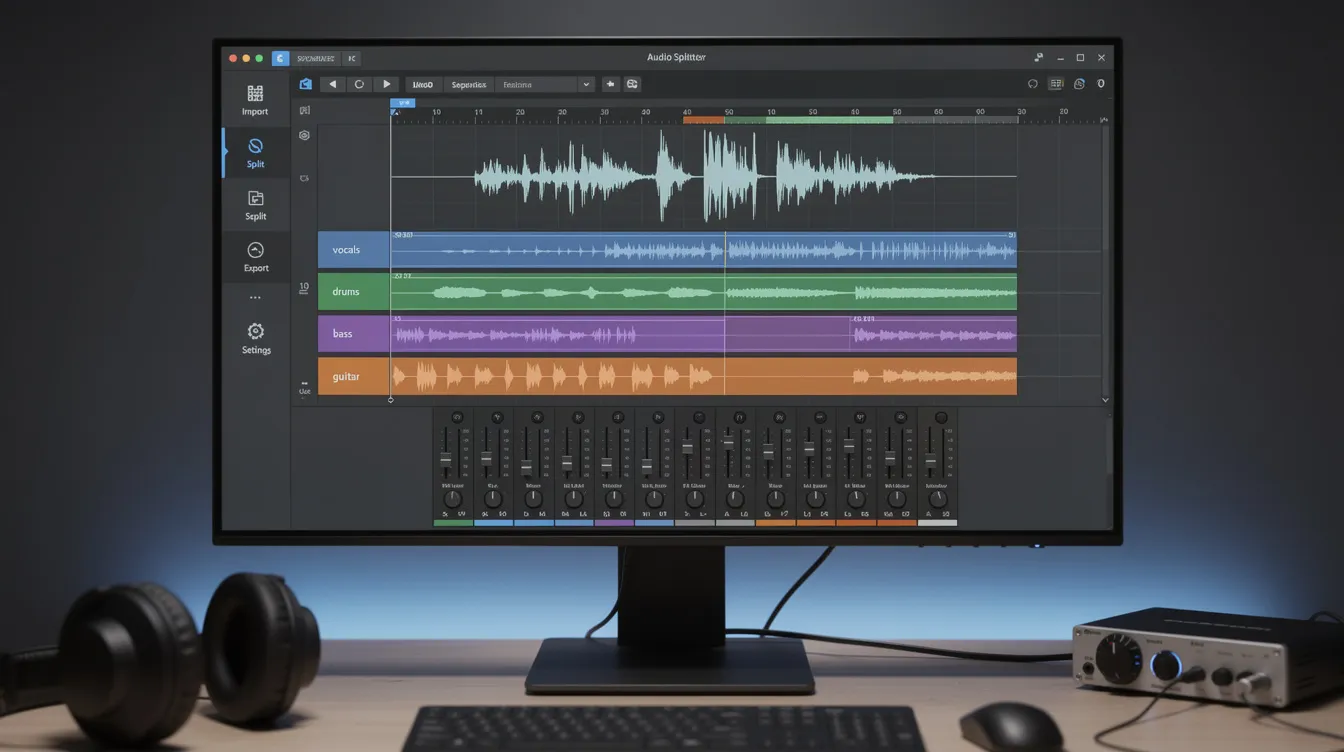
Splitter software uses machine learning models trained on thousands of isolated recordings to analyze frequency spectrums, phase relationships, and time-frequency patterns in mixed audio, then separate the mixture into individual stems that can be manipulated independently.
Key outcomes you’ll gain from this guide:
- Understanding the difference between AI stem separation and traditional file splitting
- Evaluating splitter software based on your specific audio and video needs
- Learning practical separation techniques and workflows for best results
- Identifying common pitfalls like audio artifacts and how to avoid them
- Selecting the right tool based on supported formats, file size limits, and quality requirements
Understanding Audio Separation Technology
Splitter software implements what researchers call Music Source Separation (MSS)—the process of separating one mixed audio signal into multiple source signals. In stem separation, you upload a complete song mix and receive individual tracks for vocals, drums, bass, guitar, and other instruments. This differs fundamentally from simply cutting a file into time-based segments.
This technology matters because it solves a persistent challenge in music production and content creation: accessing isolated parts when original multitrack recordings don’t exist. Whether you need to extract vocals for a remix, isolate drums for sampling, or separate speech from background music in a podcast, splitter software provides capabilities that were previously impossible without the original session files.
AI Stem Separation
AI stem separation relies on deep neural networks trained on massive datasets containing both mixed recordings and their corresponding isolated source tracks. These models learn to recognize spectral patterns, harmonic structures, and time-frequency signatures that distinguish vocals from instruments, drums from bass, and electric guitar from keyboards.
Two primary open-source architectures dominate the field: Deezer’s Spleeter, released in 2019, which offers fast processing with models for 2, 4, and 5-stem separation; and Meta’s Demucs, which processes more slowly but preserves high-frequency detail like cymbal air and reverb tails approximately 10-15% better than Spleeter on benchmark measurements. Proprietary models from services like LALAL.AI claim additional improvements in artifact reduction and the ability to distinguish between specific instruments like piano versus guitar.
Traditional Audio/Video File Splitting
Traditional file splitting divides audio files or video files into smaller files based on time markers, chapters, or specific durations—not by separating sound sources. This method handles tasks like splitting a podcast into episode segments, dividing a long recording into manageable parts, or creating chapters in video content.
The key distinction: file splitting operates on the timeline, while stem separation operates on the frequency and source content. When you split a wav file by time, both resulting files contain the same mixed audio—just different portions. When you process with stem separation, each output file contains only one source element extracted from the full duration.
Understanding this difference helps you choose the appropriate method for your workflow: use file splitting when you need to segment or distribute multiple files, and use stem separation when you need to isolate specific elements from a mix.
Types of Splitter Software Applications
Building on these technical foundations, splitter software serves distinct needs across different creative disciplines. Each application leverages the core separation technology while focusing on specific workflow requirements.
Music Production and Stem Separation
Music producers use stem separation to remix tracks when original sessions are unavailable, sample specific elements from existing recordings, and adjust mix balance in mastered tracks. A producer might isolate vocals to add new effects, extract drums to layer with different instrumentation, or remove bass to replace it with a new bass line.
Technical challenges include “bleed”—when unwanted sound leaks between stems—and artifacts like metallic shimmer on cymbals or loss of high-frequency detail. Logic Pro’s Stem Splitter in version 11.2 improved separation of guitar and piano parts from the general “other” category, demonstrating ongoing advancement in isolating specific instruments. These tools fundamentally change remix workflows by providing access to individual elements without requiring the original multitrack session.
Podcast and Content Creation
Content creators leverage splitter software to separate speech from background music, clean up recordings with unwanted audio elements, and prepare tracks for translation or repurposing. When you need to extract vocals from a video interview with background music, or isolate narration from ambient sound, stem separation tools handle tasks that manual editing cannot accomplish.
This capability proves essential when original multitrack recordings don’t exist—common with archival content, user-submitted audio, or recordings made without proper isolation. Creators can download separated stems, edit them independently, and recombine elements with new backgrounds or translations.
Educational and Practice Applications
Musicians use splitter software to learn individual parts by isolating riffs, drum patterns, or vocal melodies from recordings. Guitarists can focus on electric guitar parts without competing instruments, drummers practice along with isolated drum tracks, and singers work with instrumental-only versions.
Karaoke track creation represents another popular app of this technology—removing vocals while preserving the rest of the instrumentation. Beyond practice, these tools support music transcription and theory instruction by revealing what each instrument contributes to a complete arrangement. Students can analyze arrangements by listening to separated components, understanding how professional recordings achieve their sound.
Choosing and Using Splitter Software
Selecting appropriate splitter software requires evaluating several criteria against your specific needs: number of stems offered, audio quality and artifact levels, processing speed, local versus cloud processing, supported formats for input and output, cost structure, and integration with your existing tools.
Step-by-Step Separation Process
When approaching a stem separation project, follow this workflow to achieve best results:
- Select your source file: Use the highest quality available—preferably wav files at high bit rates rather than compressed MP3s. Input quality directly affects separation quality.
- Choose stem configuration: Select 2-stem (vocals plus instrumental) for simple separation, 4-stem (vocals, drums, bass, other) for more control, or 5-6+ stems if your tool offers instrument-specific options.
- Select the algorithm or model: Different engines trade processing speed against fidelity. Spleeter processes quickly; Demucs preserves more detail but runs slower.
- Process the audio: Either upload to a cloud service (requires internet connection) or run locally if your software supports it. Local processing offers privacy and avoids upload delays but demands sufficient hardware.
- Review separation quality: Check output stems for artifacts, bleed between sources, missing frequencies, and overall clarity. Pay particular attention to high frequencies and reverb tails.
- Post-process as needed: Apply EQ to restore lost frequencies, reduce residual artifacts, or adjust volume balance between stems.
- Export in appropriate format: Choose wav for maximum original quality and compatibility, or compress for distribution needs.
Software Comparison Framework
Evaluating splitter software requires comparing capabilities across categories that matter for your workflow:
| Criterion | Free Web Tools | Premium Software | Professional DAW Plugins |
|---|---|---|---|
| Audio Quality | Medium to High | High | Highest |
| Processing Speed | Variable | Fast | Real-time |
| File Size Limits | 50-100MB | No limits | No limits |
| Output Formats | MP3/WAV | All formats | Native DAW |
| Instrument Types | 4-6 basic | 8-12 advanced | 10+ specialized |
| Processing Location | Cloud | Local or Cloud | Local |
| Cost | Free or credit-based | Pro plan or subscription | One-time or subscription |
Free web tools like Splitter.ai and Loudly offer accessible entry points but typically limit large file uploads and processing time. Premium software like RipX provides up to 12 stems with advanced features including basic editing and EQ. DAW-native options like Logic Pro’s Stem Splitter integrate directly into production workflows, processing locally on your machine without requiring separate upload steps.
Your choice depends on volume of use, quality requirements, and whether you prioritize convenience or maximum control. Casual users can start with free tools, while professionals handling critical projects should consider premium or DAW-integrated options.
Common Challenges and Solutions
Users encounter predictable issues when working with stem separation technology. Understanding these challenges and their solutions improves outcomes and saves troubleshooting time.
Poor Separation Quality
When stems exhibit excessive bleed, dull sound, or metallic artifacts, the problem usually traces to algorithm limitations, input file quality, or model selection. Solutions include: using higher-quality source files (wav instead of heavily compressed audio), trying different separation engines (Demucs typically outperforms Spleeter for complex material by 10-15% on quality metrics), selecting tools with more advanced proprietary models, and experimenting with different stem configurations.
For professional results, avoid processing audio that’s already been heavily compressed or processed. The cleaner your input, the cleaner your separated stems.
File Size and Format Limitations
Many free stem separation service providers limit uploads—StemSplit caps at 100MB or 15 minutes, while other tools restrict monthly processing time on free tiers. When you need to process a large file or several files exceeding these limits:
Convert files to accepted formats before upload, split very long recordings into segments, consider upgrading to a pro plan if you process frequently, or install local software that imposes no restrictions. Desktop applications and DAW plugins eliminate size constraints entirely since processing happens on your hardware.
Processing Speed and Resource Usage
Cloud-based processing speed depends on server load and your internet connection stability, while local processing demands capable hardware. For acceptable local performance with modern stem separation models, you need a dedicated GPU, sufficient RAM (16GB minimum recommended), and fast storage.
Apple’s Logic Pro Stem Splitter leverages Apple Silicon for efficient local processing, demonstrating how hardware-optimized implementations achieve real-time or near-real-time performance. Users working with other users in collaborative settings or handling time-sensitive projects should evaluate whether cloud latency or local hardware investment better serves their workflow.
Conclusion and Next Steps
Splitter software selection depends on your specific use case, quality requirements, and workflow context. Free tools serve exploration and occasional use well, while professional applications demand premium solutions with advanced models and integration features. The technology continues advancing rapidly—Logic Pro recently improved guitar and piano separation, LALAL.AI released its first DAW plugin, and separation quality improves with each model generation.
Immediate next steps for implementation:
- Assess your actual separation needs: how many stems do you require, and will results be used commercially?
- Try free tools first with your typical audio material to benchmark acceptable quality
- Evaluate whether artifacts in free tool outputs affect your use case
- Consider premium options if quality falls short, prioritizing tools with models known for minimal artifacts
- Verify your hardware supports local processing if cloud upload delays or privacy concern you
Related topics worth exploring include audio mastering workflows for polishing separated stems, music production techniques for integrating separated elements into new projects, and copyright considerations when using stems from existing recordings in commercial work.
Additional Resources
Recommended free tools to start:
- Splitter.ai (Spleeter-based, supports vocal remover and reverb removal)
- Demucs (open-source, higher quality but requires local installation)
- Loudly free tier (browser-based, no install required)
Quality assessment approach: Compare separated stems against your quality threshold by checking for: high-frequency preservation, minimal bleed between stems, absence of metallic or phasey artifacts, and preserved reverb tails.
Copyright considerations: Stem separation software provides technical capability—not legal rights. Original recordings retain their copyright regardless of processing. Commercial use of separated stems requires appropriate licensing from rights holders. Many services delete uploaded files after processing, but legal responsibility for use remains with the user.